Ticketing Information

Where to Buy
-
Purchasing Online Through AXS
Tickets can be purchased 24/7 on AXS.com or through our Calendar page We do not support third party ticketing platforms, so please make sure to purchase tickets directly through our ticketing partner.
-
Box Office
Our Box Office opens 1 hour before doors on show days. United Heritage Hall is a cashless venue. Only debit, credit cards and mobile wallets like Apple Pay or Google Pay are accepted at our box office window. Please plan accordingly.
Please note, our Box Office does not participate in presales or first day on sales. All presales and first day on sales are available online at AXS.com.
-
Section Chart
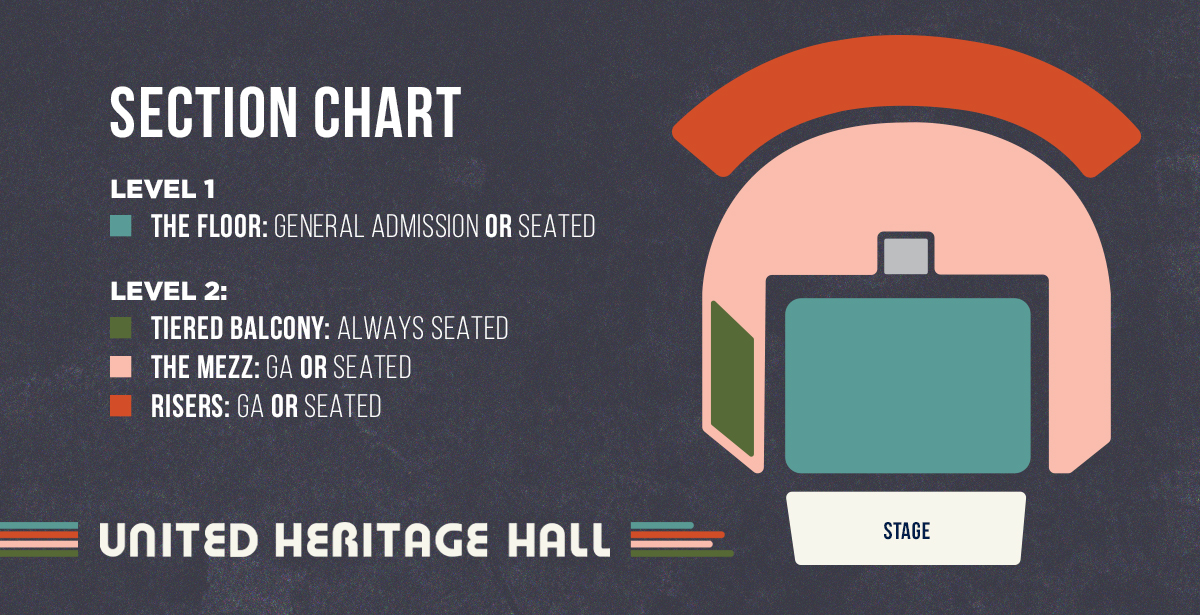
United Heritage Hall is configured to hold general admission, partially reserved seating, or full reserved seating depending on the event. There is limited reserved seating available for each show in the tiered balcony. You can confirm the floor plan for your event after clicking on the “Buy Tickets” link for your event.
AXS Mobile ID
-
AXS Mobile ID
AXS Mobile ID digital tickets are tickets you use on your phone, they make getting in easier than ever. Simply show your tickets on your phone using the AXS app to enter the venue. Be sure to download the AXS app (link) before you arrive at the venue for seamless entry!
Following these steps:
- Download the AXS app
- Open the app and login to your account
- When you arrive at the venue, open your app and click the ticket icon at the bottom of the screen. Select your event and your tickets will be displayed.
- Show the QR code at the door to be scanned
If you are going with a group, make sure everyone enters together, or transfer tickets to friends before the event.
Don’t have access to Wi-Fi? Don’t worry. Your tickets will display in the app whether or not you are connected.
-
Ticket Transfers
Tickets can be transferred via the AXS Mobile ID Digital Tickets. If the recipient has an AXS account, they will receive the tickets right away. If not, they will need to create an AXS account, and will need to have the AXS app downloaded on their phones to access the tickets. Make sure the recipient accepts the transfer for the tickets to successfully transfer.
For a step by step guide on the ticket transfer process, visit AXS.com.
-
Ticketing Customer Service
The fastest way to reach customer service regarding ticketing questions is online with AXS Support
If you have additional questions, reach out to unitedheritagehall@aegpresents.com.
-
Refunds
ALL TICKET SALES ARE FINAL. Refunds will only be offered in the case of a rescheduled or canceled event. If you decide you no longer want to attend the show, you can easily resell your ticket on AXS.com or transfer directly to a friend via the AXS app.
Upgrades
-
Quick Pass
Why wait longer? Add the Quick Pass Upgrade to your event tickets to bypass the main entry line. Upon arrival, have your Quick Pass ticket ready to scan at the venue entrance. Quick Pass can be purchased at the Box Office or selected when purchasing tickets online through AXS.com
Quick Pass requires a separate event ticket for admission and is subject to availability. Limited upgrades are available for each show.
Quick Pass is not early entry and does not compete with artist-driven VIP programs. It provides first entry when doors open to the public, allowing purchasers to enter immediately if there is a large line.